The Jobs section
The Jobs section is your book of work in Verinode: every restoration job you have run or are running now, read and organized into one place you can navigate. It is where a water loss, a fire rebuil…
On this page
What the Jobs section is
The Jobs section is your book of work in Verinode: every restoration job you have run or are running now, read and organized into one place you can navigate. It is where a water loss, a fire rebuild, a mold remediation, or a contents job stops being scattered across your estimating tool, your accounting file, and your inbox, and becomes a single portfolio Verinode can reason about.
The important thing to hold onto is what Verinode is doing and is not doing. Verinode does not run your jobs and it does not replace the software you already use to manage them. Your estimating platform, your job-management tool, your accounting system, they stay exactly where they are. Verinode reads the jobs out of those tools and out of the documents you feed it, estimates, supplements, invoices, carrier emails, and turns them into margin, cash-flow, supplement, and cycle-time intelligence you would otherwise have to assemble by hand. It is the analysis layer that sits on top of your operation, working as your Chief Data Officer: reading everything, surfacing what matters, and leaving the decisions to you.
Because of that, an empty or thin Jobs section is not a broken screen. It means the jobs, estimates, and financials that feed it have not flowed in yet. As you connect your tools and forward documents, the page fills in on its own. See connecting your data for how jobs arrive, and adding a job for the fastest ways to get your first one in.
Where to find it
Open Jobs from the sidebar. The page lives at iq.verinode.ai/jobs. The section header reads Jobs with an Add data button in the top right, which is the same capture entry point used everywhere on the platform: drop a PDF, CSV, photo, invoice, or scoping document and Verinode reads jobs out of it.
The page is built the same way as every other section home on the platform: a hero band at the top, then horizontal rows of tiles you scroll sideways through. Clicking a tile opens a slide-over card on top of the page rather than navigating away, so you can dip into a view and close it back to the map. The rest of this article walks the page top to bottom.
Note
The Jobs page is the map, not the destination. Almost every tile on it opens a deeper view or a specific job. Where a piece of intelligence has its own full article, this overview links to it rather than repeating it, so treat this page as the index to the whole Jobs and Clients area.
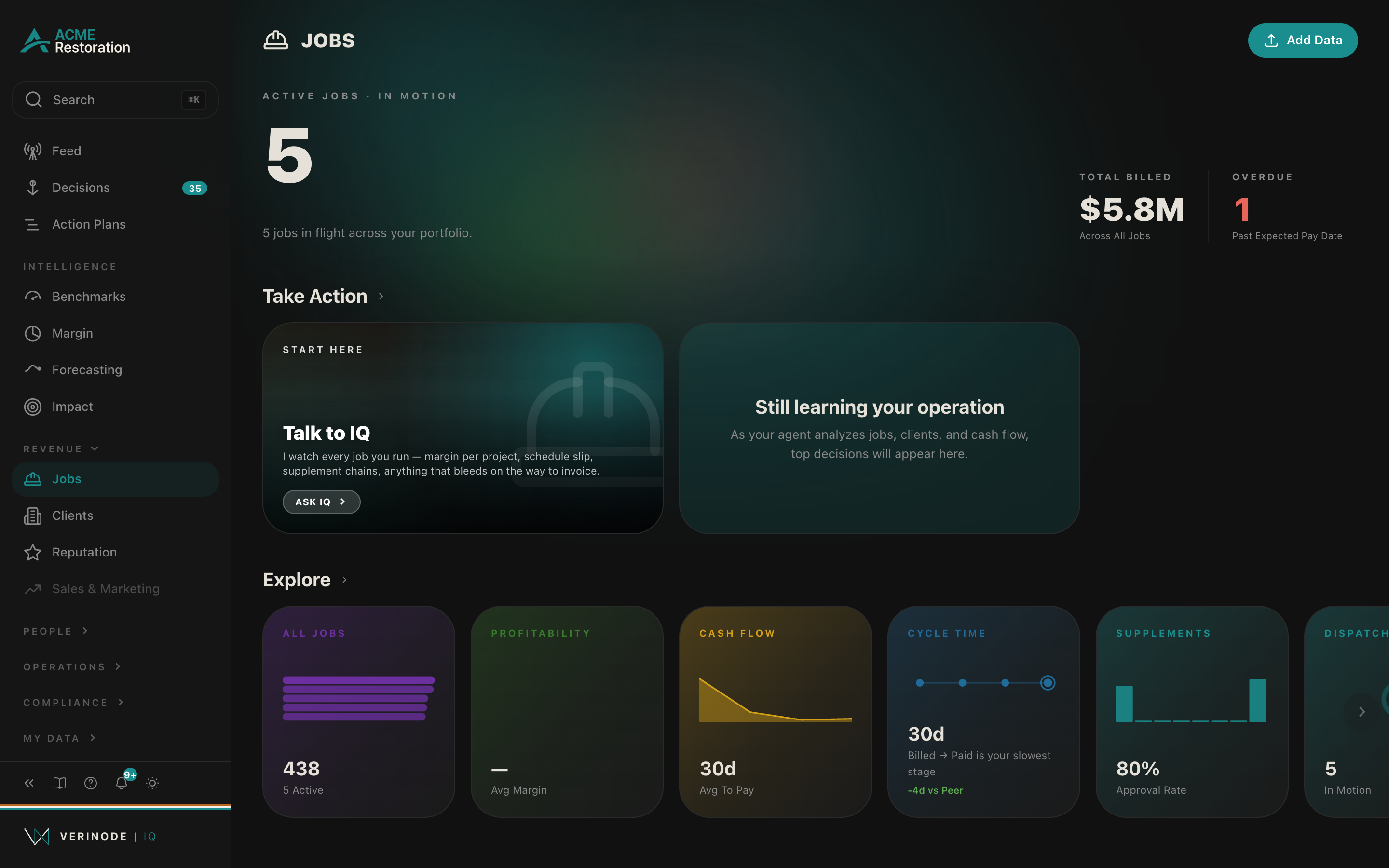
The hero: Active Jobs, in motion
The band across the top of the page is your portfolio at a glance. Its eyebrow reads Active Jobs · In Motion, and the large number beneath it is the count of jobs currently in flight, jobs whose status is active or in progress, not the total you have ever run.
Around that headline count:
- A margin pill sits beside the number when Verinode has enough to compute an average margin, reading something like "32% Avg Margin." Its color follows the same health bands used across the platform: green when average margin is 35% or higher, yellow between 20% and 35%, and Ember Red below 20%, so the pill says "healthy or not" at a glance, not just a figure.
- A subline describes the state of the book in plain language. With jobs in flight it reads "5 jobs in flight across your portfolio." With jobs on file but none active it reads "40 jobs on file, none currently active." With nothing yet it reads "Add Data, your first job lands here as soon as a CSV, photo, or email comes in."
- Two secondary figures sit to the side. Total Billed ("Across All Jobs") is the full dollars you have billed across the portfolio. Overdue reads "Past Expected Pay Date" and turns to the Analyse tone when anything is past due, or "Nothing Past Due" when the book is clean.
The hero is a read-only summary. To act on any of it, use the rows below.
Apps: the section's tools
The first row under the hero is titled Apps. Where Take Action holds what Verinode has found, Apps holds what you can start: the section's standing tools, always present whether or not anything has been found. On Jobs the row carries, left to right:
- Job Performance, a launcher into the job performance analysis deck, where you pick the jobs and run the deep margin read. See Estimate Analysis for its sibling below and the Apps row for how these launchers work everywhere.
- Estimate Analysis, a launcher into the within-your-own-book estimate check, covered in Estimate Analysis.
- Open a job's file, a picker that pulls any job's full record, the dispute detail and correspondence, and exports it. See opening a job's file.
- Ask IQ, the agent activation tile for Jobs, which retires itself once you have engaged the Jobs agent.
- Add Job, "Enter a job by hand": claim number, carrier, and amounts, useful before your first export lands or for the one job that never came through email.
- The unlock tile, which names exactly which data the section is still missing and which tool it comes from, and disappears once Jobs is fully fed.
Take Action: your top decisions on this section
Next comes Take Action. This row carries decisions only: it is where Verinode surfaces the calls worth your attention on your jobs right now, each as a tile leading with what it is, the dollars at stake, and the cost of doing nothing. Opening a tile takes you into the decision so you can work it. How these decision surfaces behave across the platform is covered in the decision workspace, and the mechanics of this row and the Explore row are covered in depth in Take Action and Explore on jobs.
When there are no decisions to show, the row is honest about why, in one of three states:
- No jobs yet. The card reads "Get jobs flowing in" with the line "Three quick moves and your first decisions surface within minutes," followed by three one-tap moves: "Upload a job export or estimate PDF," "Forward your last claim email," and "Paste an invoice or supplement." Its footer notes that "Decisions surface as jobs flow through billing + collection."
- You have cleared them all. The card reads "No open decisions on your jobs" and notes how many signals you have already worked through, adding that "New ones will surface as jobs progress through billing and collection."
- Still warming up. The card reads "Still learning your operation" with "As your agent analyzes jobs, clients, and cash flow, top decisions will appear here."
None of these is an error. They are the row telling you exactly where you are in the loop.
Explore: the seven lenses on your portfolio
The Explore row is the analytical heart of the page: a scroll of metric tiles, each a different lens on the same book of jobs, each opening a full slide-over view when clicked. Every tile leads with a headline number and a small inline chart, and the profitability, cash-flow, and supplement tiles also carry a "vs Peer" or "vs Industry" line comparing you to anonymized operators like you when peer reads are available.
- All Jobs (value: your total job count, "N active" beneath) opens the full job list, the complete book you can scan, filter, and open job by job. See finding jobs.
- Profitability (value: average margin, with a health gauge on the same 20% / 35% bands as the hero pill) opens the profitability view. The deeper margin analysis lives on the Margin section, covered in understanding your margin.
- Cash Flow (value: average days to pay, "avg to pay") opens the cash-flow view of your jobs, receivables, collection pace, and where cash is tied up.
- Cycle Time (value: the median days of your slowest stage, with the subline naming which stage that is, or "Add job dates to map your flow" when Verinode cannot yet time your pipeline) opens the same cash-flow and lifecycle view. The little pipeline preview marks the stage where your flow stalls, and the "vs Peer" line compares that stage against the same transition in a peer cohort when one has formed.
- Supplements (value: your supplement approval rate, "approval rate," or "over-approved" when it runs high) opens the supplements view, approval rates by carrier and the supplement chains behind them.
- Dispatch (value: the count of active jobs, "in motion," with a ring showing active as a share of the whole book) opens the dispatch board, which lives inside the full job list, focused on what is moving now.
- By Type (value: how many distinct job types you run, "job types vs peers") opens the by-type view, your portfolio broken out by peril, water, fire, mold, and the rest, positioned against peers.
Each of these views is a card that opens over the page; closing it returns you to this map. The financial views cross into the Margin section for the full treatment, while the tabs inside a single job's card are covered in the job detail tabs.
Capture by PM
Below Explore, a Capture by PM panel appears when, and only when, at least two comparable people have run enough jobs to compare. It reads how each project manager's approved amounts landed against their estimates and how their supplements fared, so you can see who is capturing the full scope of a loss and who is leaving money on the table. With fewer than two comparable people the panel is hidden entirely, because a single-person "comparison" would say nothing. The full read is covered in capture by PM.
Recent activity
The last row, Recent activity, is a scroll of tiles, ordered by the jobs whose records changed most recently. It is a cut of your book rather than the whole of it, so a job falls off the row once enough others have moved ahead of it; the full list is under All Jobs. An invoice or an estimate you forwarded moves a job to the front as soon as it fills something in, and so does correcting a field on the job yourself. Work on site does not move it on its own, because this row follows the record, not the crew. Each tile shows the job's title, its primary dollar amount, the client or carrier with its logo, and a meta line naming the job's category and its latest business event, "Billed May 3," "Paid Apr 18," and so on, or an "Added" time when no lifecycle date exists yet. When there is nothing to show, the row reads simply "No recent activity."
This row is the quick way into a job that has just had something land on it. Opening a job does not move it here, so a job you only looked at stays where it was. Clicking any tile opens that job directly.
Clicking a job opens its profile
Anywhere a specific job appears on this page, in Recent activity, in the All Jobs list, in a decision, clicking it opens that job's profile: the full detail card for one job, with its financials, timeline, supplements, documents, and the tabs that break it all down. The profile opens as a slide-over on top of the Jobs page, and closing it drops you back onto the map exactly where you were. The profile is the destination for everything on this page; it is covered end to end in the job profile, and its tabs in the job detail tabs.
Reading the page top to bottom
A good pass over Jobs runs downward. Glance at the hero to see how many jobs are in flight and whether anything is overdue. Reach for an Apps tile when you want to start an analysis yourself. Read the Take Action row for the decisions Verinode thinks are worth your week. Scan Explore to see which lens is flashing, a soft margin, a slow days-to-pay, a stalled stage, a weak approval rate, and open the one that matters. Check Capture by PM if it is showing. Then use Recent activity to jump straight into a job you need to look at. The page is a map; the depth lives in the views and the job profiles it opens into.
Data sources
Data sources
- 1.Your jobs, estimates, supplements, and invoices, read from your connected tools and uploaded documents. Your business.
- 2.Your billing and collection activity. Your business.
- 3.Anonymized peer distributions across consenting operators. Verinode network.
- 4.Published industry reference figures, source-attributed. Research.